
Walkthrough
Your Configuration Manager apps, published in Intune.
Watch a Devicie engineer take an SCCM application estate from export to Intune Win32 apps in about five minutes. Every app is reviewed, every decision is recorded, and nothing moves that you didn't choose to move.
Recorded in a Devicie lab with sample applications. Narrated, 5 minutes.
What you'll see
Seven steps, export to Intune
The same steps we run with your team and your app owners, in the same order.
Export
A PowerShell script on the site server reads every application's metadata. Nothing in Configuration Manager changes.
Load
The export folder loads into Devicie's App Migration Mapper, ready for review.
Analysis
Each app is assessed: publish as-is, swap for a Devicie catalog app, needs attention, duplicate, superseded or retired.
Review
Walk the list with the app owner and set a decision for every app. Each change is recorded against who made it.
Content
Source content is copied for the apps you chose to publish, and nothing else.
Publish
A plan runs first and sends nothing. Then each chosen app is packaged and published to the tenant.
Results and Intune
Results confirm every chosen app was published as decided, then we open the apps in the Intune admin center.
In the demo
25 apps in, a decision on every one
Figures from the lab run in the video, using sample applications. Your estate will look different.
| Outcome | Apps |
|---|---|
| Assessed from the Configuration Manager site | 25 |
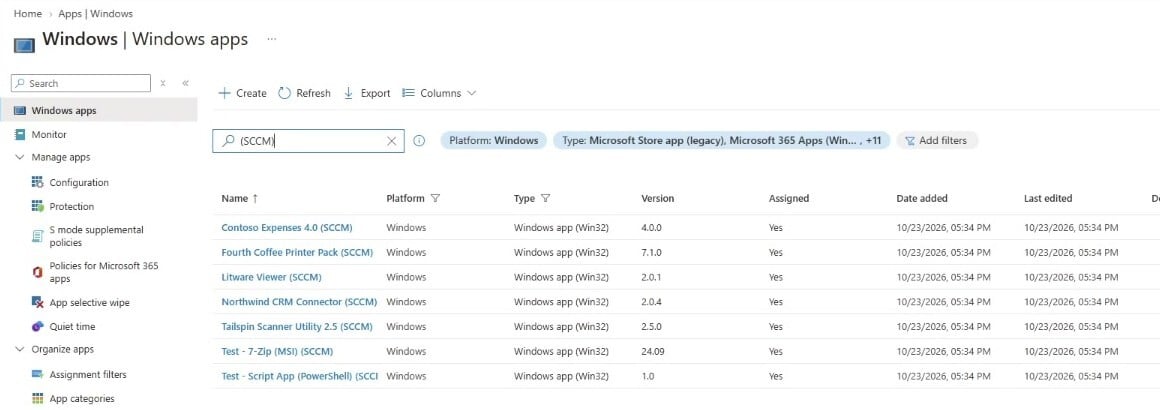
| Packaged and published to Intune | 7 |
| Moved to Devicie catalog apps, kept patched | 10 |
| Left behind: duplicates, superseded and retired apps | 8 |
Where it lands
Standard Intune apps, ready to assign
Published apps appear in the Intune admin center as Win32 apps, tagged (SCCM) so they're easy to find.
Where the Configuration Manager detection method has a direct Intune equivalent, it comes across with the app. Your team assigns and manages them in Intune, alongside everything else.
Why it works this way
A reviewed migration, not a bulk copy
Leave the clutter behind
Duplicates, superseded versions and apps already retired in Configuration Manager are flagged, so they don't follow you into Intune.
Catalog first
Where a common app has a Devicie catalog match, take that instead. It stays patched without repackaging each release.
Follow-ups in plain view
Anything that needs a person, such as dependencies, Configuration Manager settings to recreate or per-user installs to test, is listed before you publish.
See it run on your own estate.
We'll run the export and analysis with your team and show you, app by app, what moves to Intune and what doesn't.