
The platform
Intune, automated.
Build on the Intune you have and reduce the work it takes to keep applications and configuration current. Devicie brings application packaging, managed-policy drift remediation and device reporting together, so your team can spend less time maintaining the machinery behind device management.
Where you start
Start with what you have. Keep improving how it runs.
Microsoft Intune provides your device management and deployment controls. Devicie prepares and maintains supported applications, maintains supported managed policies and corrects policy drift. Establish the configuration your business needs, then keep it current as applications and requirements change. Your team retains control of requirements, exceptions and rollout.
Your starting point may be a new Intune environment, an inherited tenant or policies your team has refined for years. Agree which supported applications and policies Devicie will manage. Your team retains business-workflow validation and rollout decisions.
The work continues after setup. Publishers release updates. Administrators edit settings. Support teams need device information. Devicie handles supported package maintenance and policy correction as that work repeats.
Your team directs requirements, rollout and exceptions. Devicie reduces the recurring preparation and maintenance behind those decisions.
Capabilities
One platform. Three core capabilities.
Applications
Know what is installed and bring it under management. See application inventory and version differences across your devices. Deploy from a maintained catalog, submit your own installers for packaging, and review assignments and reported installation status.
Explore Applications →Configuration
Keep agreed settings in place as your business changes. Devicie corrects drift in managed policies and provides readable notifications about the changes and remediation. Our specialists develop and test configuration updates as Intune capabilities and security benchmarks evolve.
Explore Configuration →Reporting and data
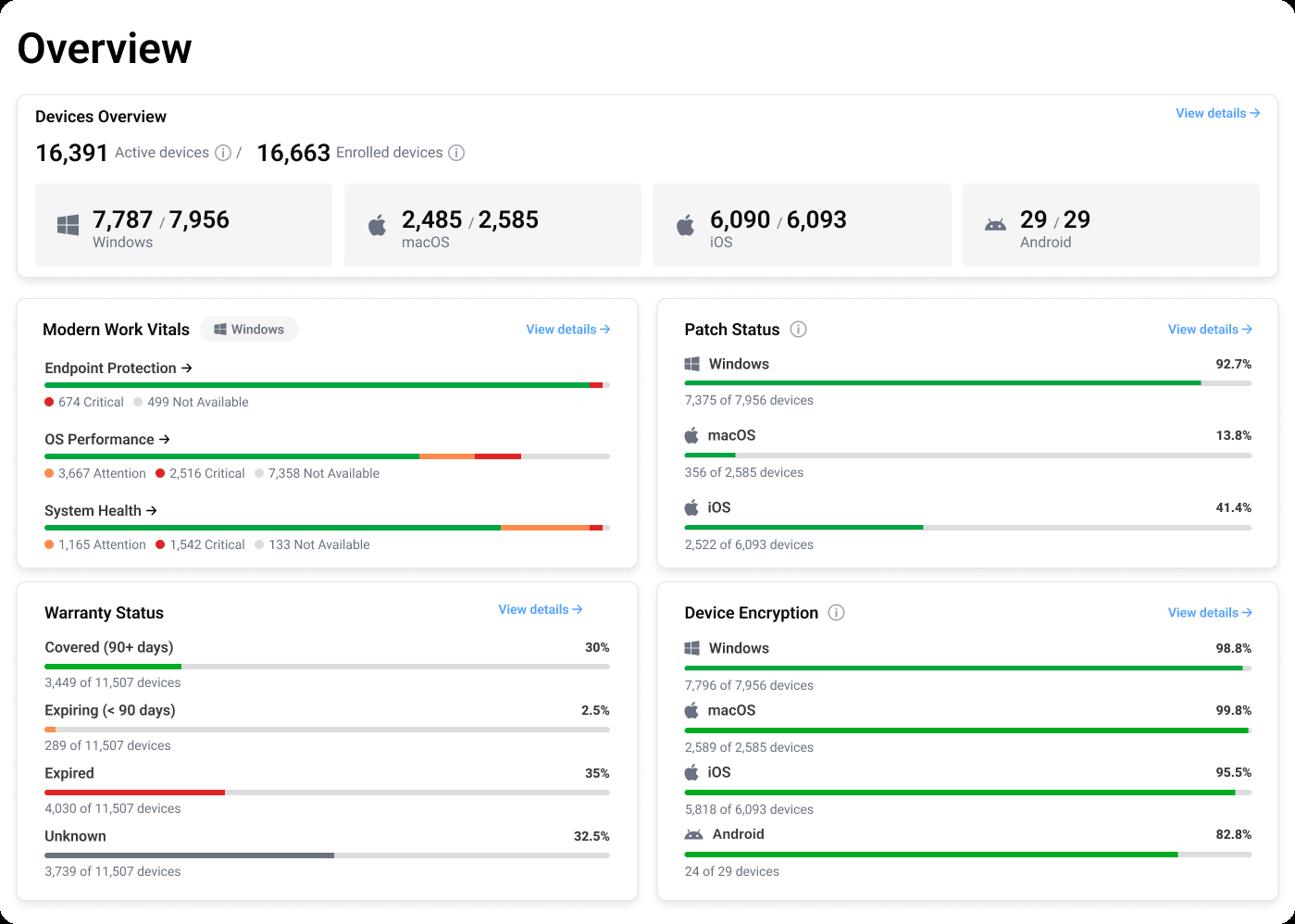
Know which devices need attention. Use application and policy details, Windows device health information, warranty reporting for supported devices and operating system patch history to inform support and planning. Reporting refreshes daily, with API access for reports tailored to your organization.
Explore Reporting and data →How it fits together
Application maintenance and configuration management, together
Consider an application your team needs to maintain. Inventory shows the installed versions. A maintained catalog package gives IT a deployment starting point. Reported installation results help the team identify devices that need follow-up.
Configuration has its own continuing process: establish the agreed managed policy, correct deviations and notify the team. When requirements change, use the intentional-change workflow.
The combination matters when your team otherwise maintains separate packaging processes, policy scripts and reporting workflows. Compare the work Devicie takes on across those responsibilities, including the tools and customer effort that remain.
Shared responsibility
Built around your existing Intune environment
Devicie works with Microsoft Intune, with responsibilities shared between the platform and your team. Intune remains the device management and deployment platform. Devicie helps your team operate the application, configuration and reporting work around it.
| Devicie provides | Your team owns |
|---|---|
| Maintained catalog applications and packaging for submitted installers | Which applications the business needs and who should receive them |
| Drift remediation for managed policies and maintained configuration options | The agreed configuration and deliberate changes to business requirements |
| Device reporting and access to available data through the API | Investigation, support priorities and planning decisions |
Build versus buy
Include ongoing operations in your build-versus-buy decision
An internal solution needs an owner after the first script runs. New releases, installer changes, configuration updates and reporting requirements keep creating work.
Compare that continuing commitment with Devicie's maintained capabilities. Include your actual application coverage, supported policy scope, remaining customer work and total cost.
Where to start
Start with your environment and your workload
Intune Health Assessment
Understand your current Intune configuration, see what is not yet turned on and prioritize what to address first.
Request an assessment →ROI calculator
Estimate the recurring application workload: compare your application list with Devicie's catalog and adjust the assumptions behind packaging, patching and provisioning.
Open the calculator →Build versus buy
Evaluate sustained capability, cost and ownership: what an internal build commits your team to over the same period, and what Devicie maintains.
Compare building and buying →See how Devicie fits the way your team works
Explore the platform, discuss the work your team handles today and see where Devicie can support ongoing application and configuration management.